 Well, last week I got the new Apple TV and I have to tell you, I was beyond impressed. Now remember, I DON’T have a house full of Mac products, but a mix. Mostly PC’s, but there is the iPhone, iPad, one Mac mini and of course, an Airport Extreme. Now, I’ve added the next generation Apple TV to the mix.
For the longest time, I’ve wanted to build a media server and I’ve toyed with building a PC solution and even a Linux server. For one reason or another, I was always pretty frustrated. One time it would be cost, the other it would be some software problem, the next it would be something in the operating system. I’ve got a library of over 600 DVD’s, plus who knows how many music CD’s, then my portfolio of images and devices that I want to show them off on. Couldn’t I get all of this to just work together?
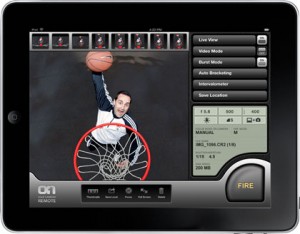
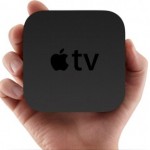
Well, this beautiful little black device showed up (it fits in the palm of your hand and is about 1 1/2 inches tall) and I plugged it in with great anticipation. It took a bit of time to set everything up because you can hook in your Netflix, YouTube, MobileMe, Flickr and other accounts. You do all the setup with this handy little remote control, but navigating through all the menus is a MAJOR pain - typing in your account names and passwords using the arrow keys for navigation over an on-screen keyboard takes forever. Of course, that’s before I remembered that I had downloaded the free Apple Remote software for the iPad! Well, sitting there controlling the Apple TV device with the iPad in my lap was the perfect solution. When it came to filling out those account names and passwords, the keyboard just popped up on my screen - brilliant! Plus, it gives you full control of your content just leaning back in your man-chair - beyond brilliant!
So…the next challenge arrived - merging content from three different iTunes machines onto a single 2 terabyte drive. I won’t go into the ins and outs of this process, but it’s not the EASIEST thing in the world to do. It actually took me several hours and some research on the Internet, but I finally figured most of it out. Moving content you have purchased from all these devices is not so bad, but all the other programs that I had converted to digital took awhile.
One tip I recommend before you throw your images from your portfolio onto that media drive is preparing the content for the iPad. Matt Kloskowski has a great set of presets for Lightroom that will allow you to resize and export your images in the perfect perspective for the iPad. You can find these and the instructions for downloading them at Lightroom Killer Tips.
Another great thing for me was the fact that all my audio podcasts were instantly available - right there on the screen! Not only that, but all of the video segments that I have created could be viewed as movies as well. Talk about cool! All the great images from the photographers that I’ve interviewed were up there on that big screen TV, while they talked about their work. Fantastic!
Now, why do I think the Apple TV is something for photographers? Well, imagine that big screen TV in your studio. Then, think of how that iPad portfolio will look on it for all your clients to see. Wow! What a great thing for a waiting room, or for your window display looking out into the street. Forget printing a bunch of images and hanging them on the walls and in your display windows. Get that big screen up and always show your best and latest work without the cost!
And finally, the rumor is, that the next update of the iPad OS (in November I hope?) is going to allow us to do even more things with this combo package. With the new AirPlay, you can stream it all from your iPhone, iPad, and iPod touch, too. So if you feel like watching a movie you have on one of your devices, you don’t need to rent or buy it again. Just tap to start playing content on your iPhone, iPad, or iPod touch, then tap again to instantly stream whatever you’re watching — or listening to — directly to your Apple TV. I can’t wait.
So, for $99, it’s probably the best thing I’ve recently added to my ‘camera bag’. My wife agrees and I think you will too!
Update: I even thought of two more applications. First, if you REALLY put it in your camera bag, what’s to stop you from visiting a client in person, taking the device out with your HDMI cord and plugging directly into THEIR big screen TV for a really ‘personal’ showing of their images. Second thought - what about all the movies we’re shooting with these HDSLR’s? This is the perfect way to show them on a much larger screen. Shoot and edit your video, and then put it together in a movie file that you add to your iTunes library. At that point, you’re able to call it up on your iPad, and then with the new AirPlay software, you’ll be able to show it on your portable device OR right on the big screen. In this case, I really can’t wait for that update from Apple!

 To listen to the full podcast interview, click on the player’s forward arrow below. You can also play the Podcast in a pop up window, download it OR subscribe to it via iTunes.